
16.1 Status
Administration → Status is a live view of the server. It refreshes every 5 seconds while visible (the server recomputes the status at most once every 5 seconds, shared by all open consoles).
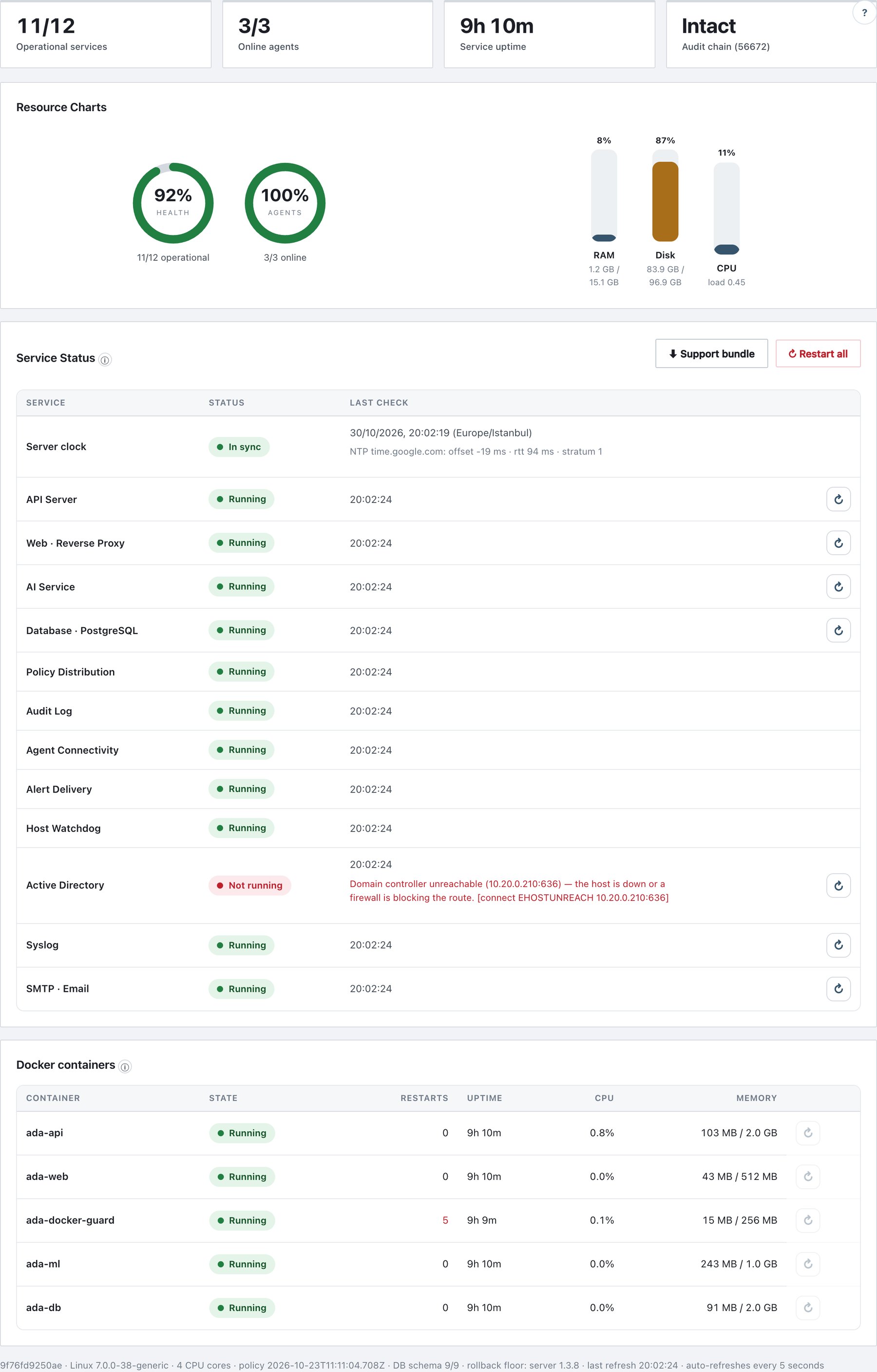
16.1.1 Summary cards
| Card | Meaning |
|---|---|
| Operational services | Services in the Service Status table that are running / services that are not disabled. |
| Online agents | Agents that sent a heartbeat in the last 180 seconds / all registered agents. |
| Service uptime | Time since the API server process started. |
| Audit chain (N) | Intact or BROKEN, with the number of records. |
16.1.2 Resource Charts
| Gauge | Calculation | Colours |
|---|---|---|
| Health donut | Operational / active services. | green ≥ 90 %, amber ≥ 60 %, red below |
| Agents donut | Online / total agents. | same |
| RAM bar | Used / total host memory. | blue; amber ≥ 75 %; red ≥ 90 % |
| Disk bar | Used / total of the data volume. | same |
| CPU bar | 1-minute load average ÷ number of cores (capped at 100 %). | same |
These are current values, not history. A full data disk stops the audit log, backups and reports; the Service health alert fires below 15 % and 5 % free space (section 15.5).
16.1.3 Service Status table
Columns: Service, Status (pill), Last check (time of the last page refresh; for a failing service the last error line appears under it and in the pill’s tooltip), and an action button.
| Row | What “Running” means | Action |
|---|---|---|
| Server clock | In sync: the NTP offset is below the drift threshold. Clock drift / NTP unreachable in red otherwise; Not monitored when no NTP server is set. Shows server time, time zone and NTP <server>: offset … ms · rtt … ms · stratum …. Configure under Settings → Time (default threshold 5 seconds). | — |
| API Server | The API process answering this page. | ↻ Restart (password) |
| Web · Reverse Proxy | nginx (ports 443 and 9443) responds. | ↻ Restart (password) |
| AI Service | The AI sidecar answers; detail shows the encoder (loads on first use until needed). Only AI example upload, training and test use it — the rest of the product works without it. | ↻ Restart |
| Database · PostgreSQL | SELECT 1 succeeds. (Data Store — file-based on
installations without a database.) |
↻ Restart |
| Policy Distribution | A signed policy is published. | — |
| Audit Log | Chain intact; shows record count. | — |
| Agent Connectivity | N/M online; grey when no agent is registered. | — |
| Alert Delivery | off (grey) when neither syslog nor e-mail is enabled; red when a syslog server or SMTP is failing. | — |
| Host Watchdog | active · last check 20s ago · saw OK · e-mail via mirror · self-heal on; red SILENT if no heartbeat for ~10 minutes; grey not installed with the install command. See section 16.6.3. | — |
| Active Directory | LDAPS check result (cached; refreshed every 5 minutes). Grey until first checked or when AD is not configured. | ↻ Check now |
| Syslog | Result of the last syslog delivery check. | ↻ Check now |
| SMTP · Email | Result of the last SMTP check. | ↻ Check now |
Status colours: green Running, red Not running, grey Disabled.
16.1.4 Docker containers table
Live data from the Docker engine for each container
(ada-api, ada-web, ada-db,
ada-docker-guard, ada-ml):
State (Running, Unhealthy, Starting, Restarting,
Paused, Exited …), Restarts (highlighted above 3 — a
rising count means a crash loop), Uptime,
CPU and Memory (per container, with
the limit). The last column offers ↻ (restart) for a
running container or ▶ (start) for a stopped one.
The footer line shows host name, OS, CPU cores, published policy version, DB schema N/M and the rollback floor (the oldest server version that can run on this database schema).
16.1.5 Restarting and starting services
Services can be restarted or started from the console, never stopped: a stopped Ada would leave every endpoint unmanaged and could lock you out of the console. Stop the stack from the host if you must.
- Click ↻ on a service or container row (or ▶ for a stopped container).
- Confirm the dialog (… will be restarted — there will be a brief interruption. Continue?).
- For API Server, Web · Reverse Proxy and ↻ Restart all, enter your password when asked.
- Wait a few seconds and refresh the page.
| Action | Effect |
|---|---|
| Restart API Server | The API exits and Docker restarts it. All console sessions are dropped; sign in again. |
| Restart Web · Reverse Proxy | Console and agent connections drop for a few seconds. |
| Restart Database | Database connections drop briefly (Database is restarting; connections will drop briefly.). |
| Restart AI Service | An AI upload or training in progress is interrupted. |
| ↻ Restart all | Restarts the web proxy and then the API server. The database and AI service are not restarted. |
Every action writes service_restarted /
service_started, or service_action_failed
(which also raises a Service health alert). Auditors see the
page but all buttons are disabled.
16.1.6 Support bundle (console)
⬇ Support bundle downloads a zip for vendor support. It is available to administrators only.
| Included | Excluded |
|---|---|
| Server status (as on this page), System journals (last 2,000 lines), the last 300 log lines of each container, configuration files, health state, watchdog heartbeat, agent inventory, audit counts, policy metadata | Audit records (personal data), policy content (your rules), console users, keys, licence file, agent token, the watchdog SMTP mirror |
Secrets are removed in two layers: every JSON key that looks like a
credential is replaced with ***, and the known secret
values of this installation (agent token, database and
admin passwords, SMTP/AD/SMB passwords, Microsoft 365 add-in key …) are
scrubbed from every text file, logs included. If a source cannot be
collected, the message says how many and lists them in
WARNINGS.txt inside the zip. Each download writes
support_bundle_created.