
8.1 The Labels page
The page has a collapsible help box (How do labels work?), a toolbar with + Add Label, and one card per label. The cards are sorted by sensitivity order, lowest at the top.
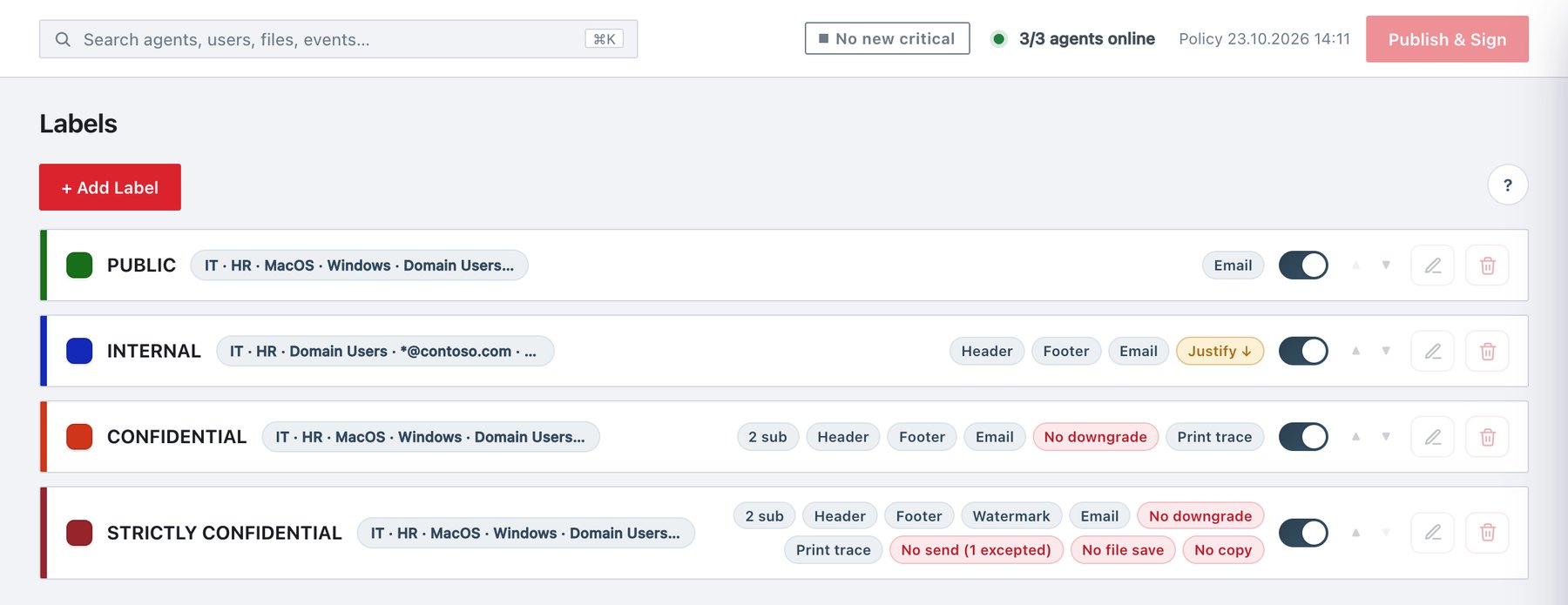
Card anatomy
| Element | What it shows |
|---|---|
| Accent bar | A 5-pixel bar in the label colour on the left edge of the card. |
| Colour swatch and name | The label colour and the label name. |
| Group badge | Common when the label goes to everyone. Otherwise the names of the groups it is delivered to, joined with ” · “. Excluded groups are added as”(excluding Finance, HR)“. Long lists are truncated; hover to see the full text. |
| disabled badge (red) | The label’s Enabled switch is off. The card is also dimmed. |
| name issue badge (red) | The name is empty or another label has the same name. Publishing is blocked until you fix it. |
| Marking pills | A short summary of the label’s settings, described in the next table. If the label has none, the card shows no markings. |
| Enabled switch | Turns the label on or off. The tooltip reads “Hidden from pickers when off”. The change goes to the draft at once, without a Save. |
| ▲ / ▼ | Move up (lower sensitivity) and Move down (higher sensitivity). See section 8.2. ▲ is disabled on the first card and ▼ on the last. |
| Edit (pencil) | Opens the label drawer. For the Auditor role the drawer is read-only. |
| Delete (bin) | Deletes the label after a confirmation that lists everything else that changes. See section 8.11. |
Marking pills
| Pill | Colour | Shown when |
|---|---|---|
N sub |
Indigo | The label has N sub-sensitivities. |
Header, Footer,
Watermark |
Indigo | The document header, footer or watermark text is set. |
Email |
Indigo | An email header, email footer or subject marking is set. |
Justify ↓ |
Amber | Justification required on downgrade is on. |
No downgrade |
Red | Downgrade not allowed is on. |
No print |
Red | Printing blocked is on. |
Print trace |
Indigo | Print trace ID is on. |
No send / No send (N excepted) |
Red | Cannot be sent via Outlook is on, with N recipient exceptions if any. |
No file save |
Red | Email file save blocked (Outlook) is on. |
No copy |
Red | Copying blocked is on. |
If there are no labels yet, the page shows No sensitivity labels yet with a + Add Label button.