
10.7 Logs
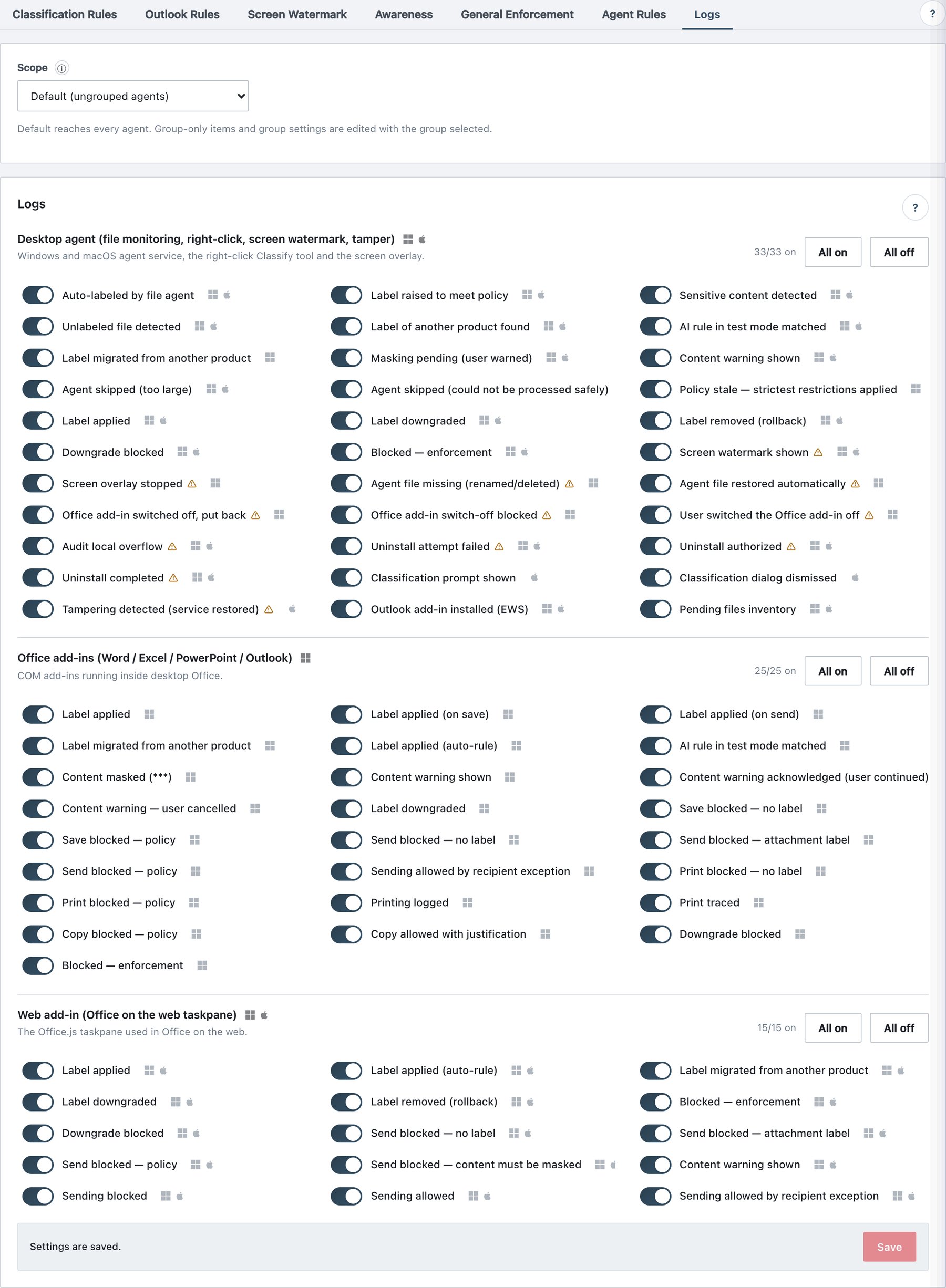
Policy → Rules → Logs decides which client events are reported to the server, per surface. Administrator and server events (logins, policy publishes, service actions…) are not listed and can never be switched off.
10.7.1 What the page shows
The tab has no per-group scope — with a group selected it says This tab has no per-group scope — it applies to all agents, including “Finance”.
For each surface:
- Title with platform icons and a one-line hint.
- Counter
n/m on, buttons All on and All off. - One switch per event with its display name, a ⚠ for security/evidence events (turning it off creates a blind spot in the audit trail) and platform icons. Hovering a row shows its description.
- Save bar at the bottom (draft → Save → Publish & Sign).
| Surface (UI title) | Emitted by | Events |
|---|---|---|
| Desktop agent (file monitoring, right-click, screen watermark, tamper) | Windows and macOS agent service, right-click Classify tool, screen overlay | 33 |
| Office add-ins (Word / Excel / PowerPoint / Outlook) | Windows desktop Office COM add-ins | 25 |
| Web add-in (Office on the web taskpane) | Office.js task pane (Office on the web, new Outlook, Mac Office, Windows Office) | 15 |
10.7.2 Event reference
Desktop agent (W = Windows only, M = macOS only, otherwise both):
| Switch | Meaning |
|---|---|
| Auto-labeled by file agent | File agent silently enforce-labeled an unlabeled file. |
| Label raised to meet policy | File agent raised a label to meet policy. |
| Sensitive content detected | Content matched a rule; the user was notified. |
| Unlabeled file detected | Unlabeled file found in a watched folder. |
| Label of another product found | File carries a Purview/Titus label — feeds the label migration report. |
| AI rule in test mode matched | An AI rule in test mode would have acted; nothing changed. |
| Label migrated from another product (W) | Bulk migration tool wrote the mapped Ada label. |
| Masking pending (user warned) | A masking rule matched during scan. |
| Content warning shown | A Warn rule matched a changed file (notification only). |
| Agent skipped (too large) | File exceeded Max scanned file size. |
| Agent skipped (could not be processed safely) | Isolated reader crashed / ran out of memory or time; skipped until the file changes. |
| Policy stale — strictest restrictions applied | Agent could not reach the server for the configured days (Settings → Security). |
| Label applied / Label downgraded / Label removed (rollback) | Right-click classification results. |
| Downgrade blocked / Blocked — enforcement | Blocked actions. |
| Screen watermark shown ⚠ | Trace-code evidence. |
| Screen overlay stopped ⚠ (W) | Overlay disappeared while it should be on. |
| Agent file missing ⚠ (W) / Agent file restored automatically ⚠ (W) | Protected agent file removed / restored. |
| Office add-in switched off, put back ⚠ (W) / … switch-off blocked ⚠ (W) / User switched the Office add-in off ⚠ (W) | Office add-in lock events. |
| Local audit queue overflow ⚠ | Local queue exceeded its limit (50 MB on Windows); oldest records dropped. |
| Uninstall attempt failed ⚠ / Uninstall authorized ⚠ / Uninstall completed ⚠ | Tamper protection events. |
| Classification prompt shown (M) / Classification dialog dismissed (M) | macOS save prompt. |
| Tampering detected (service restored) ⚠ (M) | launchd service restored by the watchdog. |
| Outlook add-in installed (EWS) | Outlook add-in installed into the mailbox. |
| Pending files inventory (opt-in) | See section 10.7.4. |
Office add-ins (Windows): Label applied; Label applied (on save); Label applied (on send); Label migrated from another product; Label applied (auto-rule); AI rule in test mode matched; Content masked (***); Content warning shown / acknowledged (user continued) / user cancelled; Label downgraded; Save blocked — no label / — policy; Send blocked — no label / — attachment label / — policy; Sending allowed by recipient exception; Print blocked — no label / — policy; Printing logged; Print traced; Copy blocked — policy; Copy allowed with justification; Downgrade blocked; Blocked — enforcement.
Web add-in: Label applied; Label applied (auto-rule); Label migrated from another product; Label downgraded; Label removed (rollback); Blocked — enforcement; Downgrade blocked; Send blocked — no label / — attachment label / — policy; Send blocked — content must be masked; Content warning shown (Send anyway itself is not reported back); Sending blocked (legacy name); Sending allowed; Sending allowed by recipient exception.
10.7.3 How the switches are enforced — the three gates
| Gate | Where | Effect |
|---|---|---|
| 1 | Windows and macOS agent audit queue (one funnel for the agent service, the four COM add-ins, the right-click tool and the overlay) | Disabled events are dropped at send time — they never leave the machine. |
| 2 | Web add-in (postAudit) |
Disabled web events are not sent. |
| 3 | Server ingest | Disabled events are silently discarded on arrival (still acknowledged, so clients do not retry). |
Because of gate 3 a change takes effect immediately after Publish & Sign, and fully once clients have synced the new policy. The surface of a record is derived from its origin: COM add-ins → Office add-ins, Office.js task pane → Web add-in, everything else → Desktop agent.
10.7.4 Pending files inventory (opt-in)
Unlike all other switches, Pending files inventory is OFF unless explicitly turned on. When on, each agent uploads its current list of files waiting for a label, a recommendation decision or masking — file names and folders only, no content, compressed, no size limit. It feeds the Unlabeled Files (current) report and the Agents drawer. Turning it off clears the lists held on the server.
10.7.5 Procedure — silence noisy printing events
- Policy → Rules → Logs.
- In Office add-ins, switch off Printing logged (keep Print traced and the blocked events).
- Click Save, then Publish & Sign. The publish record shows Client logging switches changed.