
8.9 Group targeting and group exceptions
Group targeting
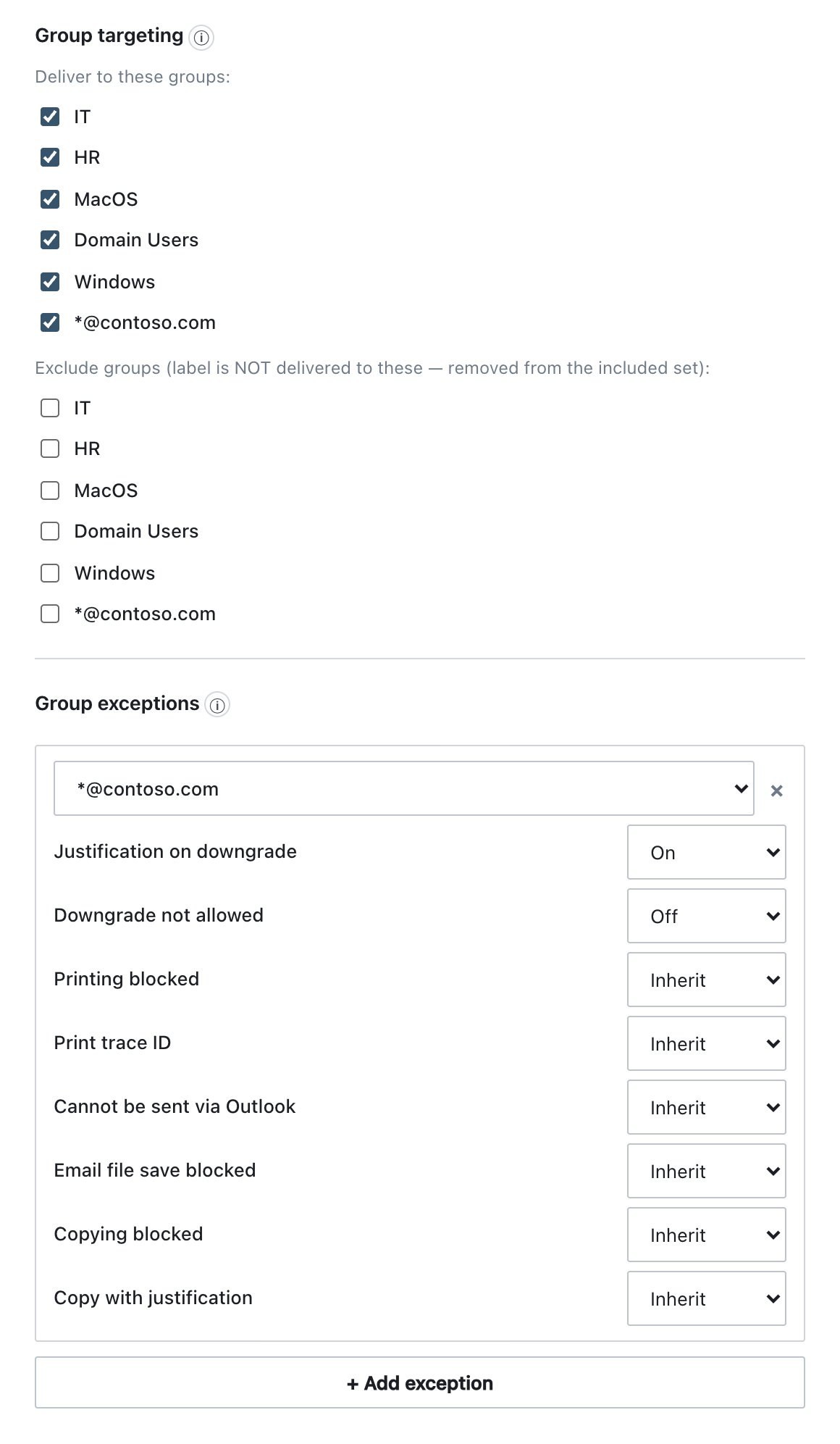
This section decides which machines receive the label. Chapter 9 (Groups) explains how machines are placed in groups.
| Field | What it does | Default |
|---|---|---|
| Deliver to these groups: | Tick one or more groups to deliver the label only to them. With nothing ticked, the label is Common and reaches every agent, grouped or not. | Nothing ticked (Common) |
| Exclude groups (label is NOT delivered to these — removed from the included set): | Groups that never receive the label. Use this to keep a Common label away from a few groups. | Nothing ticked |
- The same group cannot be in both lists. Ticking it in one list unticks it in the other.
- Exclusion always wins.
- If no groups exist, the section shows No groups defined — you can create them in the Groups tab.
Group exceptions
Group exceptions override this label’s restrictions for one group, for example “printing of Strictly Confidential is blocked, except for Executives”. The section appears only when at least one group exists.
- Click + Add exception. A card appears with the first group that has no exception yet. The button is disabled when every group already has one.
- Choose the group in the card’s drop-down.
- For each restriction choose Inherit, On or Off: Justification on downgrade, Downgrade not allowed, Printing blocked, Print trace ID, Cannot be sent via Outlook, Email file save blocked, Copying blocked, Copy with justification.
- Click × to remove the exception card.
- Inherit writes nothing, so the group follows the base restriction. If you later change the base, every group left on Inherit follows the change.
- For Print trace ID, the exception only turns the trace on or off. Fields, placement, font, size and colour always come from the base settings.
- The server applies the exceptions when it builds and signs that group’s policy. Endpoints only see the final settings and do not know an exception exists.
- Publish & Sign is refused when an exception can never apply: when the group is excluded from the label, or when the label is delivered only to other groups. It is also refused when there are two exceptions for the same group.