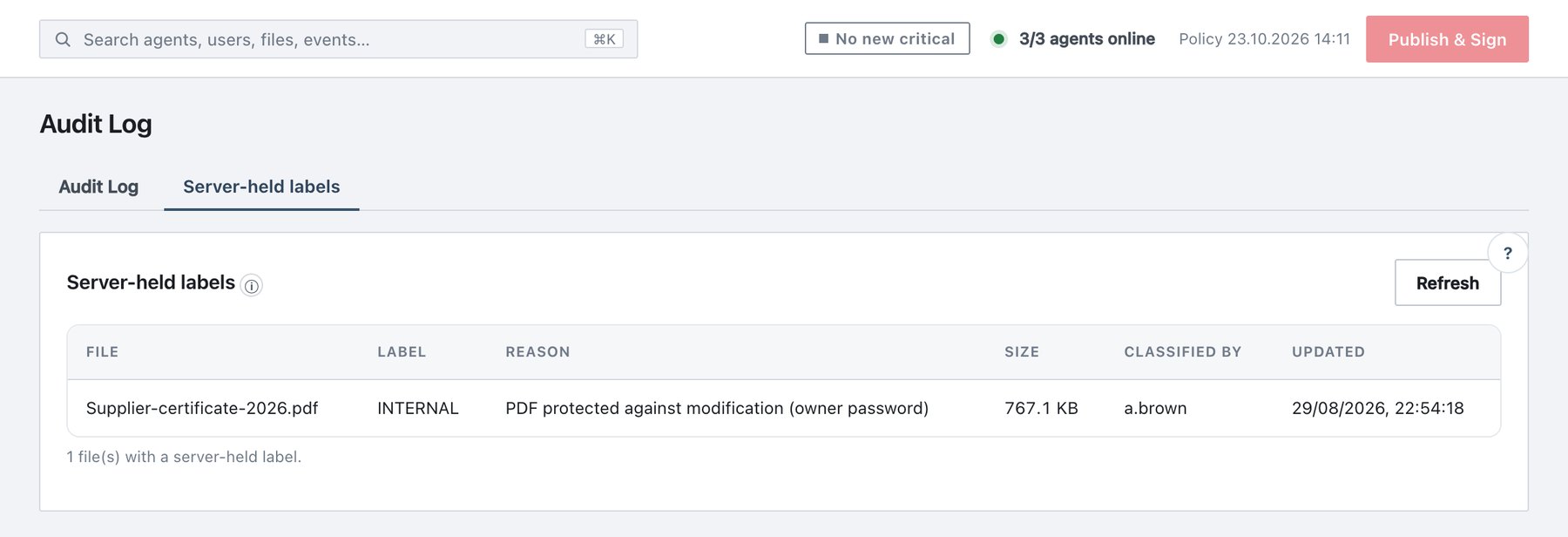
13.6 Server-held labels (label registry)
Activity → Audit Log → Server-held labels (sub-tab next to Audit Log) lists files whose label could not be written into the file, and is therefore recorded on the server. The typical case is a PDF protected against modification with an owner password. The record is keyed by the file’s content hash (SHA-256), not its name or path. Every copy of the same bytes shares one entry.
Each agent pulls the registry into a local cache at heartbeat cadence. Save, send and attachment checks look the file up locally, so a classified-but-unwritable file is still recognised everywhere Ada runs.
The list is read-only. Entries come only from agents classifying files, never from the console.
| Column | Meaning |
|---|---|
| File | File name when the label was recorded ((unknown name)
if none); the tooltip shows the content hash |
| Label | Label name resolved from the current policy
(Label — Sub-label for sub-labels). If the label was
deleted from the policy, the raw label ID is shown. |
| Reason | PDF protected against modification (owner password) or The file could not be modified in place |
| Size | File size |
| Classified by | User who labelled the file |
| Updated | Last time the entry was written |
Controls and limits: - Refresh reloads the list. -
The footer shows N file(s) with a server-held label. - The
console shows the 500 most recently updated entries. -
With no entries: “No server-held labels. Every classified file carries
its label inside it.”
Audit events: - file_label_registered: an agent recorded
a label. - file_label_reassigned: another machine
relabelled the same content. - file_label_denied: an agent
tried to remove another agent’s entry. -
file_label_unregistered: the entry was removed.